
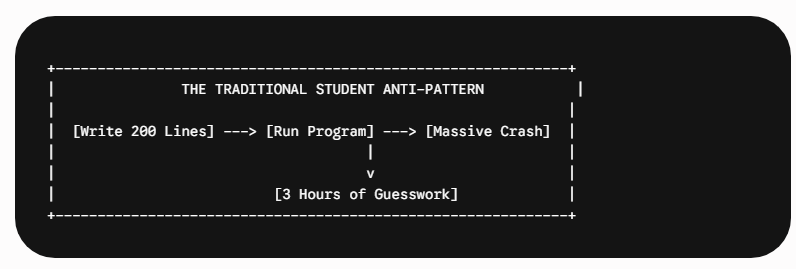
For high school and university students across the United States entering the world of computer science, one experience is almost completely universal: spending three minutes writing a block of code, followed by three frustrating hours trying to figure out why it does not run.
The initial excitement of building a digital application quickly vanishes when confronted with a terminal screen filled with cryptic, multi-line error messages. This precise moment—scrolling through red text, changing random lines of code in a desperate bid to force a successful compilation, and staring at a broken layout—is a primary reason many talented students abandon their introductory computer science tracks early in their academic careers.
However, elite programmers and successful senior software engineers do not thrive simply because they are faster at typing or possess an innate, superhuman ability to spot missing semicolons. They succeed because they view programming as an architectural discipline. They design their software to fail cleanly and employ structured, strategic systems that minimize troubleshooting time entirely.
By shifting your cognitive focus from fixing broken code to preventing bugs through evidence-based learning strategies, any student can radically accelerate their programming journey. If you want to transform your academic experience, learn how to study for computer science using professional methodologies that keep the joy of creation alive.
1. The Myth of the “Heroic Debugger” in Computer Science Education
Many high school and undergraduate computer science students believe a harmful misconception: that great software engineers are master troubleshooters who can glance at a hundred lines of chaotic spaghetti code and instantly pinpoint a missing token or logical anomaly. This image of the heroic coder who fixes systemic errors on the fly is completely false.
In professional software development and advanced academic tracks, the primary goal is not to become faster at fixing bugs; the goal is to build software using structural systems that make bugs exceptionally difficult to create in the first place. When errors do inevitably occur, the codebase should be engineered to reveal exactly where the problem lies without requiring hours of manual, exhausting investigation.
When you spend an entire evening tracking down a single execution error, it is rarely due to a lack of core intelligence or analytical capability. Instead, it is almost always a structural failure of your workflow. When foundational design patterns break down, students frequently find themselves overwhelmed, searching for external resources to do my c programming homework just to parse out where their logic went wrong. The most common bottlenecks include: :
- Over-coding: Writing massive blocks of syntax at once before executing a single test.
- Abstract Fog: Trying to type out code when you lack a crystal-clear understanding of the underlying logic of the algorithm.
- Monolithic Monsters: Failing to break a large, complex assignment prompt down into small, isolated, independently testable pieces.
To protect your GPA, save time, and build consistent academic momentum, you must move away from trial-and-error programming. You need to adopt structured frameworks that streamline development from day one.
2. Learn How to Write Pseudocode First (The Feynman Technique for Coding)
The most common cause of endless, looping debugging sessions is trying to write syntax while you are still actively figuring out how the algorithm is supposed to work. When a student tries to translate a vague concept directly into strict programming syntax like Python, Java, or C++, the result is frequently chaotic, disorganized, and riddled with deep logical errors. For students tackling complex data structures or object-oriented concepts for the first time, securing reliable python assignment help at Myassignmenthelp.com can provide the structural clarity needed to master these workflows.
To bypass this pitfall completely, students should apply an adapted version of the famous Feynman Technique: if you cannot explain your algorithm in plain, simple English, you are not structurally ready to write it in code.
The Three-Step Logic Breakdown
Before you open an Integrated Development Environment (IDE) like VS Code or PyCharm, use a physical notebook or a blank text editor file to lay down the absolute blueprint of your application.
- Write the Goal in Plain English: State exactly what the function or program needs to accomplish at a human level. For example: “This function takes a list of student test scores, filters out any scores below 50, calculates the mathematical average of the remaining numbers, and returns that precise average.”
- Draft the Pseudocode: Write out the logical execution flow step-by-step without worrying about syntax rules, brackets, data types, or semicolons. Use universal language commands.
- Trace with Dummy Data: Walk through your pseudocode manually using a pen and paper with a tiny sample dataset (like an array of four numbers) to see if your logical steps actually yield the correct mathematical result.
By explicitly verifying your logic at this abstract, high-level tier, you ensure that when you finally begin typing out real syntax, any subsequent errors will likely be minor typos or easily fixed compiler complaints rather than foundational logical flaws that require massive, demoralizing rewrites.
3. The Power of Micro-Development Cycles
Consider the classic student mistake: reading a computer science assignment prompt, sitting down for two hours to type out 150 continuous lines of code, and clicking the “Run” button for the very first time. Predictably, the console lights up like a Christmas tree with dozens of independent error messages. Because fifty different variables and loops changed at the exact same time, finding the root cause becomes a deeply exhausting guessing game.
The definitive solution practiced in elite engineering spaces is the Micro-Development Cycle. The foundational rule is simple: never write more than 5 to 10 lines of code without running, testing, and thoroughly verifying the changes.
The 3-Step Iteration Loop
To turn this into an automatic habit, view your development process as a rapid, continuous loop:
Imagine the shift in efficiency. If you run your script after adding only five new lines of code and an execution error suddenly screen-flashes, the location of the bug is completely obvious: it must reside within those five new lines. This completely eliminates the need to scan through hundreds of lines of legacy code, shrinking your debugging window down from hours to a fraction of a single second.
4. Divide and Conquer via Modularization
When a university-level program is built as one giant, continuous block of sequential instructions inside a single file, a bug introduced in one section can trigger unpredictable, cascading side effects across the entire system. To prevent this architectural complexity from spiraling out of control, you must practice strict modular programming by deliberately breaking applications down into small, single-purpose functions.
A highly reliable rule of thumb for computer science beginners is that a single function should do exactly one thing, and it should ideally fit entirely on a laptop screen without requiring you to scroll down.
The Real-World Benefits of Modular Design
Suppose you are building a text-based strategy game for a high school AP Computer Science project. Instead of writing everything inside a massive, unreadable main() loop, split your responsibilities into isolated, autonomous modules:
- load_user_profile()
- calculate_combat_damage()
- update_scoreboard()
If your game runs fine but the scoreboard consistently displays mathematically incorrect data during execution, you don’t waste a single moment reading through your profile configuration or parsing combat equations. The structural issue is mathematically guaranteed to reside inside the update_scoreboard() function. Isolating your components prevents your codebase from transforming into an entangled web where a small change in one place causes mysterious failures elsewhere.
5. Implement Smart Logging and Avoid the “Print Search”
When a calculation returns an unexpected value, many introductory students instinctively pepper their scripts with arbitrary statements like print(“here”), print(“works”), or print(x). Within twenty minutes, this habit results in a cluttered, messy terminal output filled with generic strings that offer zero diagnostic context, making it harder to track down the root issue.
Instead of this chaotic approach, computer science students must practice highly structured, informative logging by outputting clean state updates that display precise context alongside variable values.
- Ineffective Diagnostic Output: print(data)
- Effective Diagnostic Output: print(f”[DEBUG] Inside calculate_average() – Total Passing Scores: {len(passing_scores)}, Current Sum: {total_sum}”)
By formatting your diagnostic output clearly, your terminal windows convert into a structured, easily readable timeline of your application’s internal execution state. You can visually trace exactly how your variables transform step-by-step through every single loop iteration, making anomalies stand out instantly without requiring hours of deep inspection.
6. Leverage Academic Support Networks for Rapid Upskilling
While mastering self-sufficiency is a vital component of growing into a competent engineer, stubbornness can heavily hinder your academic performance. Spending four consecutive hours completely stuck on a confusing environment configuration, a broken compiler path, or an opaque algorithm requirement is rarely an efficient use of your limited educational time. Knowing exactly when to look outside for expert guidance is a core digital skill.
When local resources like high school teachers, university teaching assistants, or peer study groups are unavailable due to late hours or busy schedules, leveraging external professional networks can keep your learning trajectory perfectly on track. Platforms that offer dedicated [computer science assignment help] provide students with direct access to experienced mentors who can break down complex algorithmic concepts, clarify confusing project rubrics, and demonstrate real programming best practices.
Rather than using these support platforms as a temporary fix for homework assignments, strategic students utilize academic consultants as educational accelerators. Seeing exactly how a seasoned professional structures an object-oriented solution, writes automated test suites, or configures a local development environment provides a clear model that you can emulate in future projects. This preventative learning keeps you from falling into repetitive debugging traps and protects your overall academic track.
See also: Business Networking Tips That Actually Work
7. Retain Knowledge with Systematized Coding Reviews
Improving at programming is not just about writing new code; it is also about retaining the memory of how you solved old problems so you do not repeat the exact same mistakes. When students solve a tough, exhausting bug after an intensive search, they often save the file, close their IDE, and never look back. As a result, when they encounter the exact same error three weeks later during a timed midterm exam, they have to repeat the entire investigation from scratch.
To break this counterproductive cycle completely, you can utilize proven memory retention methods like spaced repetition and dedicated technical journaling to permanently reinforce complex syntax patterns.
Keeping a “Bug Journal”
Whenever you encounter a programming error that takes longer than ten minutes to diagnose and resolve, log it in a simple markdown document using three fast bullet points:
- The Symptom: What was the exact error message or unexpected behavior displayed by the compiler?
- The Cause: Why did this happen in plain English? (e.g., “Off-by-one error because the loop index ran to <= length instead of < length.”)
- The Fix: What code snippet or architectural modification resolved the issue?
Before you begin a new coding session or start a fresh homework assignment, a quick five-minute review of your recent journal entries refreshes your active memory, ensuring you instantly recognize and resolve those specific syntax errors the second they appear again.
8. Learn How to Debug Code with Professional Tools
Modern integrated software applications include built-in tools designed specifically to completely eliminate traditional debugging guesswork. Learning to navigate these professional features early in your academic path will save you hundreds of hours of homework frustration.
Key Tools Every Student Must Master
| Tool | Core Academic Function | Why It Beats Traditional Methods |
| The Interactive Debugger | Sets breakpoints to pause program execution at a specific line in real time. | Allows you to inspect live variable values and step through execution line-by-line instead of writing dozens of messy print statements. |
| Version Control (Git) | Creates local and remote incremental save points for your entire project directory. | If you have a working program and break it while adding a feature, a single command (git checkout) rolls your files back instantly to safety. |
Frequently Asked Questions
Q.1 Is it normal to feel overwhelmed by compiler error messages?
Absolutely. Standard compiler outputs are engineered for technical efficiency, not conversational warmth. They display stack traces and raw internal operations that look like nonsense to beginners. Over time, you will recognize that 90% of your errors stem from a small pool of common mistakes—such as type mismatches, out-of-bounds indices, or null references. Treating these errors as clues rather than critiques is an essential milestone in your computer science education.
Q.2 Why should I write pseudocode if it isn’t real, executable syntax?
Writing pseudocode forces your brain to solve the mathematical or logical problem separately from the mechanical syntax problem. When you try to do both at once, you split your cognitive processing power, which leads to structural flaws. Think of pseudocode as a architectural sketch; you wouldn’t lay bricks without a blueprint, and you shouldn’t type out strict loops without a clear conceptual trajectory.
Q.3 When is it appropriate to look for external computer science assignment help?
You should seek external academic support when you hit a dead-end that halts your educational progress—such as a complex development environment configuration failure or an abstract algorithmic concept that your course material fails to clarify. The marker of a professional developer is knowing when to look outside for documentation and guidance to save valuable time and preserve momentum.
Q.4 Will utilizing built-in IDE debuggers make me a lazy programmer?
The exact opposite is true. Senior engineers do not use print statements to monitor complex corporate architecture; they rely exclusively on interactive debuggers, memory profiling tools, and breakpoints. Learning these professional workflows early in your education proves to university instructors and future employers that you possess advanced digital skills and a mature approach to software production.
Conclusion: Shifting the Programming Paradigm
Learning how to program should be an incredibly engaging, empowering process of building digital tools, experimenting with logic, and solving creative problems—not an endless exercise in tracking down broken syntax and missing characters.
By prioritizing logical planning through plain-English pseudocode deconstruction, adopting micro-development cycles, writing clean modular functions, and utilizing external academic frameworks when necessary, high school and university students can completely transform their workflows.
The ultimate goal is to write code deliberately, test it systematically, and eliminate the friction of debugging entirely. By adopting these core engineering habits early in your education, you can spend far less time looking at broken screens and far more time creating impactful software that drives your future career.
About the Author – Drake Miller
I am a dedicated academic blogger at Myassignmenthelp.com with experience in creating informative and student-focused content for learners across various academic levels. My work centers on assignment support, academic organization, research methods, and effective learning strategies. Through clear insights and practical guidance, I aim to help students improve their academic outcomes, maintain motivation, and confidently overcome challenges throughout their educational journey.